Hi guys! I tested Gemini AI photo prompts to see how well the model handles outdoor adventure photography. One category that consistently produces impressive results is African safari photography.
The combination of open landscapes, wildlife, natural daylight, and travel-inspired styling creates images that feel authentic rather than overly edited.
While testing these prompts, I focused on realistic safari experiences instead of dramatic movie-style scenes. The goal was to create photos that look like genuine travel memories captured during a wildlife adventure.
In this collection, I’m sharing my favorite Gemini African Jungle Safari prompts designed to generate realistic safari portraits with natural environments, authentic wildlife settings, and true-to-life outdoor photography.
I generated all of these images using Gemini 3.1 Pro model, you can even try the 3.5 Flash model for fast results but Pro one will give you best results.
Safari Campfire Lunch Break Scene

Preserve the uploaded individual’s facial identity, skin details, and realistic appearance throughout the image. Create a daytime African safari camp scene where the subject is seated at an outdoor picnic-style setup during a lunch break between wildlife drives. The environment contains safari tents, folding chairs, outdoor cooking equipment, and open grasslands stretching into the distance. The subject wears practical outdoor safari clothing and sits naturally while interacting with the surroundings. The image should feel like a genuine travel memory captured during a real safari experience. Trees, grasses, and distant wildlife may appear naturally within the environment. The atmosphere must remain realistic and documentary-like rather than cinematic. No artificial lighting, no dramatic color grading, no influencer-style editing, no unrealistic animal proximity, and no background blur. Every detail should resemble an authentic daytime safari photograph. Clear sharp face. Quality: 8K. Aspect ratio 3:4.
 Copy
Copy Join
JoinWalking Through Safari Grasslands

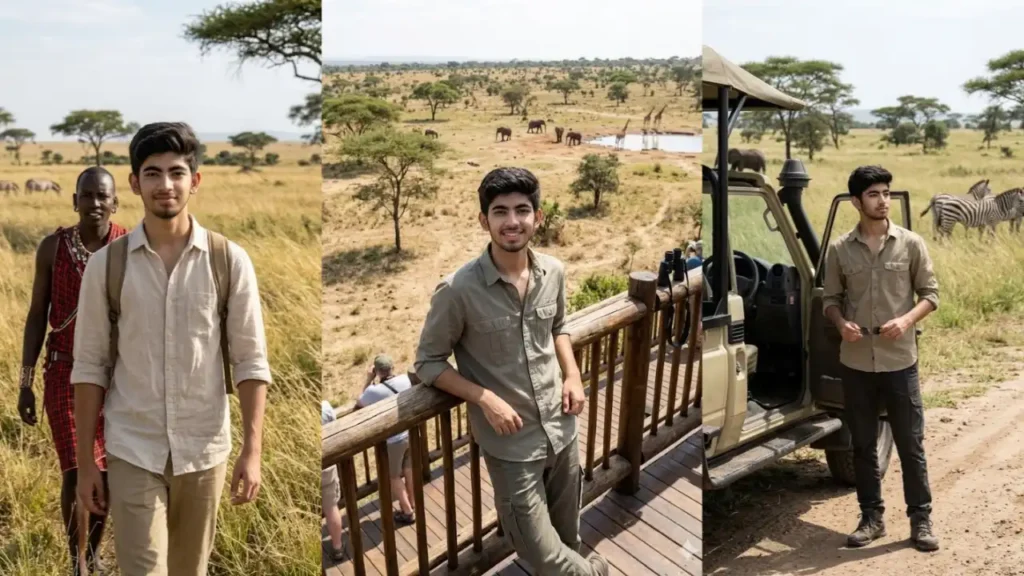
Preserve the uploaded person’s authentic face, skin texture, body structure, and natural appearance while placing them in a realistic African safari environment. The subject is walking through open grasslands alongside a local safari guide during a daytime nature expedition. Tall golden grasses sway naturally in the wind while distant acacia trees create a recognizable African landscape. The subject wears comfortable safari clothing suitable for warm weather and carries a small backpack. The scene should feel educational and adventurous rather than dramatic. Wildlife such as zebras or antelope may appear naturally in the distance without dominating the frame. The subject looks toward the camera with a relaxed expression while continuing the walk. Realistic daylight conditions, natural environmental textures, accurate vegetation, clear facial details, no cinematic lighting, no excessive color enhancement, no background blur, and no unrealistic wildlife interactions. Clear sharp face. Quality: 8K. Aspect ratio 3:4.
Riverside Safari Camp Portrait

Keep the uploaded person’s face, hairstyle, age appearance, and natural features fully recognizable. Create a realistic daytime portrait near an African safari camp located beside a river. The subject stands casually near canvas tents and outdoor seating while observing the surrounding wilderness. The environment includes dry grass, scattered trees, and a calm river flowing naturally through the landscape. A few animals such as giraffes or elephants can be visible far in the background near the water source. The clothing should consist of practical safari attire rather than fashion-oriented outfits. The atmosphere should feel authentic and grounded, similar to a real travel documentary photograph. Natural sunlight illuminates the entire environment evenly without dramatic shadows or stylized effects. No cinematic color grading, no exaggerated editing, no background blur, realistic wildlife behavior, realistic proportions, and clear facial visibility. Clear sharp face. Quality: 8K. Aspect ratio 3:4
Safari Jeep Wildlife Observation Portrait

Use the uploaded photo as the identity source and preserve the person’s recognizable facial features, natural skin texture, hairstyle, body proportions, and authentic appearance. Create an ultra-realistic African jungle safari scene where the subject is standing beside an open safari jeep during a daytime wildlife tour. The environment should resemble a real East African safari reserve with tall grasslands, scattered acacia trees, dusty tracks, and distant wildlife visible naturally in the landscape. The subject wears practical safari clothing including a lightweight khaki shirt, cargo trousers, and hiking boots. The pose should feel natural and unposed, as if someone paused briefly during an actual safari excursion. The face should remain completely clear and recognizable. The image must feel like a genuine travel photograph rather than an edited social media post. Natural daylight only, realistic environmental details, realistic shadows, realistic wildlife scale, no exaggerated colors, no cinematic effects, no artificial lighting, no background blur. Clear sharp face. Quality: 8K. Aspect ratio 3:4.
Safari Lodge Balcony Morning Portrait

Preserve the person’s recognizable appearance from the uploaded image and integrate them naturally into a realistic African safari lodge setting. The subject stands on a wooden balcony overlooking an expansive wildlife reserve during a bright daytime morning. The scene includes distant grasslands, scattered acacia trees, and wildlife moving naturally through the environment. The subject wears comfortable casual safari clothing such as a lightweight shirt and neutral-colored trousers. One hand rests casually on the balcony railing while looking toward the camera. The environment should feel calm, authentic, and similar to a real vacation photograph taken during a safari trip. Natural daylight evenly illuminates the face and surroundings. Avoid luxury influencer aesthetics or excessive image polishing. Realistic environmental detail, natural colors, no background blur, no cinematic grading, and no unrealistic wildlife placement. Clear sharp face. Quality: 8K. Aspect ratio 3:4.
Safari Observation Tower Portrait

Use the uploaded image as the identity foundation while preserving natural facial features, expressions, and realistic body proportions. Create a realistic daytime safari scene where the subject stands on a wooden observation tower overlooking an expansive African wildlife reserve. The landscape below contains grasslands, scattered trees, and distant wildlife visible throughout the environment. The subject wears neutral-colored safari attire and rests casually against the railing while looking toward the camera. The angle should feel slightly elevated to emphasize the scale of the surrounding reserve. The scene should resemble a genuine travel photograph taken during a safari excursion rather than a professionally staged photoshoot. Natural daylight, realistic vegetation, authentic environmental textures, and accurate wildlife placement are essential. Avoid cinematic effects, over-processed colors, artificial atmosphere, unrealistic shadows, and background blur. Clear sharp face. Quality: 8K. Aspect ratio 3:4.
What Makes a Good Safari AI Photo?
A realistic safari image is very different from a cinematic action poster. During my testing, I found that the best results usually include:
- Natural daylight instead of dramatic lighting
- Realistic wildlife distances
- Practical safari clothing
- Open landscapes with visible terrain
- Natural body language
- Documentary-style travel photography
The more realistic the scene description, the more believable the final image becomes.
Do You Need Animal Photos for These Prompts?
No.
The prompts are designed so Gemini can generate realistic safari environments and wildlife on its own.
However, if you want a specific animal or location, you can upload reference photos and add instructions such as:
- Use the uploaded elephant image
- Use the uploaded lion photograph
- Use the uploaded safari vehicle
This gives Gemini more visual guidance.
How to Change the Safari Location
One of the easiest ways to customize these prompts is by changing the environment.
You can replace general safari descriptions with:
- Serengeti grasslands
- Maasai Mara reserve
- Ngorongoro conservation area
- Botswana wetlands
- Namibian desert safari
- African river safari
Small location changes often create completely different results.
Can You Add Friends or Family?
Yes.
Upload multiple photos and modify the prompt by replacing:
“the subject”
with
“the group”
or
“all uploaded people”
For example:
“Preserve the recognizable facial features of all uploaded people and place them together during a safari adventure.”
This works well for family travel photos and friend group edits.
How to Use These Safari Prompts in Gemini
- Visit Gemini and start a new chat.
- Upload a clear photo of yourself.
- Choose one of the safari prompts.
- Paste the prompt into the chat.
- Generate the image.
- If needed, edit clothing, animals, or location by changing a few words in the prompt.
- Save the final image.
Frequently Asked Questions
1. Will Gemini change my face?
Not if you use the identity-preservation instructions included in the prompts. These are designed to keep your facial features recognizable.
2. Can I choose specific animals?
Yes. You can replace general wildlife references with:
- Lion
- Elephant
- Giraffe
- Zebra
- Rhino
- Cheetah
or any combination you prefer.
3. Which photo works best?
A clear front-facing photo with good lighting usually gives the most accurate results.
4. Why do some safari images look unrealistic?
This often happens when prompts include dramatic movie-style effects, unrealistic animal interactions, or excessive cinematic lighting. Natural descriptions usually produce better results.
5. Can I create couple or family safari photos?
Absolutely. Upload multiple photos and update the prompt so Gemini preserves all uploaded faces instead of a single person.