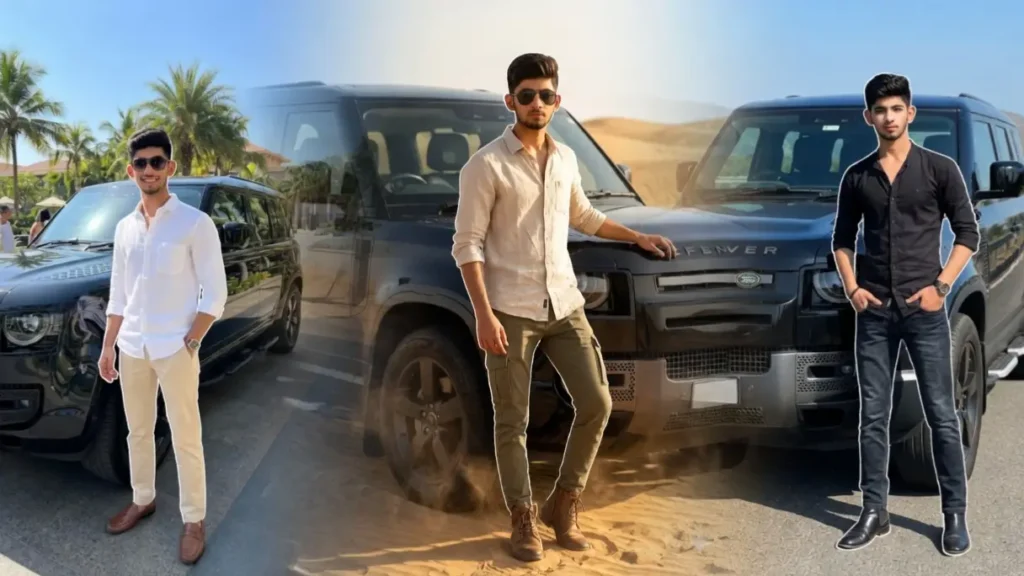
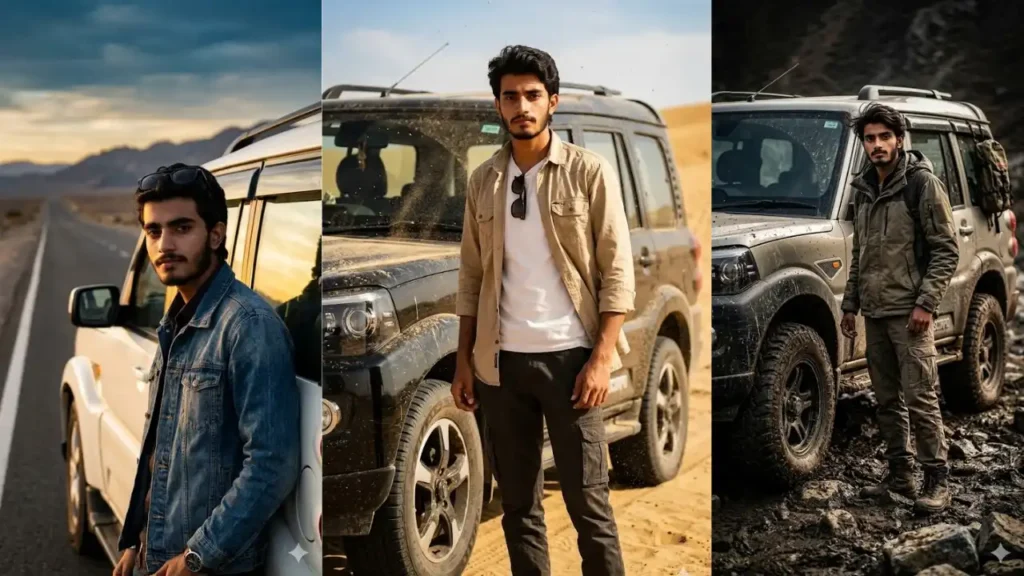
Gemini prompt Thar car: Thar isn’t just a car: it’s a statement of power, attitude, and personality. And now, with Gemini AI, you don’t need an actual SUV or a photoshoot to create that bold look.
You can simply upload your photo and transform it into a cinematic Thar-style poster where you’re standing beside a rugged SUV in deserts, mountains, city streets, or luxury settings.
These prompts are designed in a way that Gemini keeps your real face unchanged while building a complete scene around you: including the Thar, lighting, outfit, and environment.
But the real power of these prompts is not just using them, it’s editing them smartly to create your own unique variations.
Here are 10 Google Gemini AI Photo Editing Prompts For Men With Thar Car:
Lakeside Mahindra Thar Prompt For boys and Girls

Maintain the exact facial identity of the uploaded user photo and transform the user into a hyper-realistic cinematic portrait standing beside a deep blue Mahindra Thar SUV parked near a scenic lake during bright sunny daytime. The user wears a casual oversized shirt, cargo pants, and stylish sunglasses, giving a relaxed luxury traveler vibe. Sunlight reflects naturally across the water and vehicle body while soft wind moves the user’s clothes and hair realistically. The camera captures a slightly wide cinematic composition with beautiful reflections and shallow depth of field. Add TikTok-style cool-blue cinematic grading with aesthetic sunlight glow and atmospheric softness. Ultra-realistic textures, realistic shadows, and sharp facial detailing throughout the image.Negative prompt: cartoon style, anime shading, unrealistic reflections, distorted face, CGI textures, blurry environment, dark lighting.Clear Sharp face. Quality: 8K. Aspect ratio 3:4.
 Copy
Copy Join
JoinWhite Thar Minimal Luxury Portrait

Create an ultra realistic luxury lifestyle portrait featuring the uploaded user standing confidently beside a white off-road Thar SUV parked in front of a modern blue-and-white striped architectural wall. Preserve the user’s exact real facial identity perfectly including face shape, hairstyle, beard details, skin texture, jawline, body proportions, expression, and natural appearance with 100% facial accuracy. Maintain the exact same relaxed standing posture with one hand inside the pocket and casual minimalist body language.The camera angle should be slightly low and wide, capturing the full side-rear perspective of the white Thar SUV while keeping the user centered naturally in front of the rear wheel area. Maintain the exact car positioning, wheel angle, vehicle proportions, reflections, and realistic off-road SUV details. Preserve the modern minimal aesthetic and spacious composition exactly like a premium influencer photoshoot.The user should wear relaxed modern casual fashion with oversized white t-shirt, faded denim jeans, white sneakers, black sunglasses, and subtle luxury accessories. Preserve realistic fabric folds, casual oversized fit, soft denim textures, and authentic fashion styling.Focus heavily on ultra realistic lighting and natural reflections. Create soft diffused daylight lighting with realistic sky reflections on the white Thar body, subtle chrome reflections, soft ambient shadows under the vehicle, natural sunlight bounce from the pavement, and smooth skin highlights. Add realistic glass reflections on the windows, subtle tire shadows, soft HDR contrast, and cinematic outdoor brightness. Maintain accurate light falloff across the entire frame for maximum realism.Apply premium Instagram-style color grading with slightly cool white-blue tones, soft cinematic contrast, realistic dynamic range, shallow depth of field, and luxury automotive photography aesthetics. The final image should look like a professionally shot luxury SUV lifestyle campaign with ultra realistic outdoor lighting and modern influencer vibes.Aspect ratio 3:4. Add “geminiaiprompt.online” as a small watermark at the bottom-left corner, thin elegant cursive strokes, soft white color, subtle premium handwritten signature style, slight transparency, blends naturally into the image.
Thar Lover Ai Photo Prompt For Boy
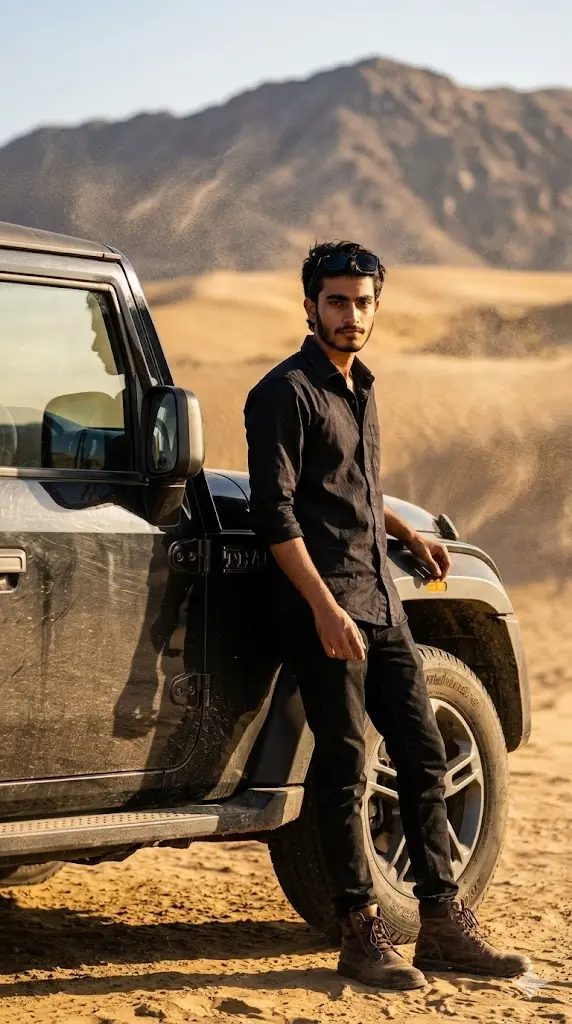
Maintain the exact facial identity of the uploaded user photo and transform the user into a hyper-realistic cinematic portrait standing confidently beside a rugged Mahindra Thar SUV in a vast desert landscape. The user wears a stylish black shirt, sunglasses, and rugged boots, exuding a bold and dominant attitude. The Thar appears dusty and powerful with detailed tires and reflections under harsh sunlight. Wind blows sand particles across the scene while the user looks directly at the camera with a confident expression. Golden sunlight creates strong shadows and highlights across the face and vehicle. Ultra-realistic photography with cinematic depth and sharp textures. Aspect ratio 9:16.
Dust Storm Thar Power Shot
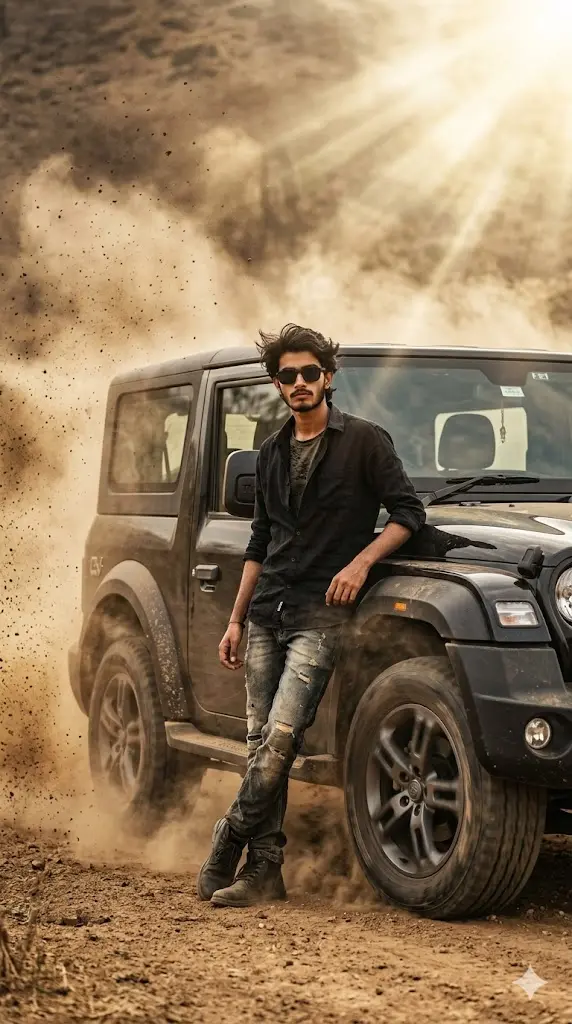
Maintain the exact facial identity of the uploaded user photo and transform the user into a hyper-realistic cinematic portrait standing beside a moving Mahindra Thar SUV creating a dramatic dust storm effect. The user wears a casual rugged outfit with sunglasses, showing fearless attitude. Dust particles swirl dynamically around the scene, partially covering the vehicle while sunlight breaks through the dust creating cinematic highlights. The user stands confidently facing the camera while wind moves hair and clothes naturally. The Thar appears powerful and dominant with realistic motion and texture. Ultra-realistic environment and lighting. Aspect ratio 9:16.
Black Thar Night Luxury Mafia Portrait

Create an ultra realistic cinematic luxury portrait featuring the uploaded user standing confidently beside a black off-road Thar SUV at night in a premium palm-lined urban location. Preserve the user’s exact real facial identity perfectly including face shape, hairstyle, skin texture, jawline, body proportions, expression, and natural appearance with 100% facial accuracy. Maintain the exact same elegant posture with calm luxury attitude while standing beside the front-side wheel area of the black Thar.The camera angle should remain slightly low and cinematic, capturing both the user and the full side-front perspective of the black Thar SUV exactly like a premium luxury automotive advertisement. Maintain the exact vehicle positioning, wheel proportions, glossy reflections, and aggressive SUV stance. Preserve the spacious nighttime composition with tall palm trees aligned perfectly in the background.The user should wear a luxury black tailored suit with fitted black pants, black formal shirt, polished loafers, and subtle mafia-inspired rich-boy styling. Preserve realistic clothing folds, tailored fitting, fabric shine, and premium luxury fashion textures.Focus intensely on cinematic nighttime lighting realism. Use realistic streetlight illumination with warm golden lighting falling naturally on the user’s face, suit, and vehicle body. Add realistic glossy reflections across the black SUV paint, subtle rim highlights on the vehicle edges, realistic windshield reflections, soft pavement reflections, and cinematic specular highlights on the luxury outfit. Include atmospheric depth using distant streetlights, subtle bokeh, soft nighttime haze, and realistic shadow gradients under the vehicle and around the legs.Create a rich cinematic luxury color palette using warm amber highlights mixed with deep black shadows and cool night-blue background tones. Apply realistic HDR lighting balance, soft depth of field, premium automotive photography aesthetics, and ultra realistic luxury-nightlife vibes. The final image should look like a high-budget billionaire lifestyle campaign with cinematic nighttime realism and luxury mafia aesthetics.Aspect ratio 3:4. Add “geminiaiprompt.online” as a small watermark at the bottom-left corner, thin elegant cursive strokes, soft white color, subtle premium handwritten signature style, slight transparency, blends naturally into the image
Dust Drift Mahindra Thar AI Photo Prompt For Boy

Maintain the exact facial identity of the uploaded user photo and transform the user into a hyper-realistic cinematic action portrait standing beside a moving black Mahindra Thar SUV creating a dramatic dust drift effect on an open dirt road during bright daytime. The user wears a rugged beige shirt, cargo trousers, sunglasses, and boots, projecting strong off-road attitude. Dust particles swirl dynamically through the air while sunlight creates warm highlights and cinematic shadows. The camera angle captures motion from a side perspective with realistic motion blur around the drifting dust but keeping the user’s face perfectly sharp. Add TikTok-style warm cinematic grading and aesthetic sunlight flares. Ultra-realistic vehicle reflections and detailed textures throughout the frame.Negative prompt: cartoon style, anime art, CGI dust effects, distorted face, unrealistic motion blur, plastic skin, nighttime lighting.Clear Sharp face. Quality: 8K. Aspect ratio 3:4.
Urban Street Boss Thar Prompt For Boy

Maintain the exact facial identity of the uploaded user photo and transform the user into a hyper-realistic cinematic portrait standing beside a modified matte grey Mahindra Thar SUV parked on a stylish urban street during bright daytime. The user wears a streetwear hoodie, ripped jeans, sneakers, chain accessories, and sunglasses, creating a modern influencer-style attitude. Tall buildings and soft traffic blur appear in the background while sunlight reflects naturally across the car and pavement. The camera uses a slightly tilted cinematic angle for a premium social media aesthetic. Add TikTok-style high-contrast color grading with subtle glow effects and soft sunlight flares. Ultra-realistic skin textures and highly detailed Thar reflections.Negative prompt: anime drawing, CGI textures, unrealistic buildings, distorted anatomy, blurry face, plastic skin, dark night atmosphere.Clear Sharp face. Quality: 8K. Aspect ratio 3:4.
Luxury White Thar Roadside AI Photo Prompt For Boy

Maintain the exact facial identity of the uploaded user photo and transform the user into a hyper-realistic cinematic portrait leaning casually against a glossy white Mahindra Thar SUV parked beside a luxury roadside café during bright daytime. The user wears a clean white shirt, slim-fit jeans, sneakers, and stylish sunglasses, creating a rich modern aesthetic. The scene features bright sunlight reflecting beautifully across the Thar body panels and glass windows. The camera uses a slightly side-angled portrait composition with shallow depth of field and aesthetic bokeh in the background. Add TikTok-style premium color grading with soft warm highlights and cinematic contrast. Natural wind subtly moves hair and clothes for realism.
Dubai Luxury Thar Night Portrait

Transform the uploaded user into a luxury Dubai nightlife portrait while preserving the user’s exact facial identity, face shape, hairstyle, skin texture, beard details, body proportions, and natural appearance.Place the user standing confidently in front of a black Mahindra Thar parked on a city street at night. Maintain a relaxed luxury pose with one leg casually crossed in front of the other, both hands resting naturally near the waist, shoulders relaxed, and a calm confident expression directed toward the camera.Dress the user in a premium white oversized luxury t-shirt with minimal chest branding, fitted black trousers, luxury wristwatch, and stylish red, white, and black high-top sneakers. The outfit should feel clean, expensive, and modern without excessive accessories.The black Mahindra Thar should occupy most of the frame behind the user, positioned at a slight front three-quarter angle showing the iconic grille, headlights, wheels, hood reflections, and rugged luxury styling. The vehicle should have glossy paint with realistic reflections from surrounding city lights.The background features Dubai’s futuristic skyline at night with illuminated skyscrapers, luxury city lights, elevated roads, and the iconic Museum of the Future prominently visible behind the vehicle. Include distant city landmarks, glowing windows, and premium urban atmosphere.Use realistic night photography lighting with warm street lamps, cool city ambient light, soft reflections on the car body, subtle rim lighting around the user, and realistic highlights on clothing and skin. Add cinematic depth, luxury lifestyle mood, and natural light falloff.Apply premium luxury Instagram-style color grading with rich blacks, warm golden city lights, cool urban tones, realistic contrast, clean highlights, subtle bokeh, and professional DSLR photography quality. Sharp subject focus with slightly softened background depth.Ultra realistic, luxury lifestyle photography, Dubai millionaire aesthetic, premium automotive portrait, cinematic night atmosphere, highly detailed, realistic reflections, professional photography, social media influencer quality.Aspect ratio 3:4.
Rainy Road Thar Attitude Shot
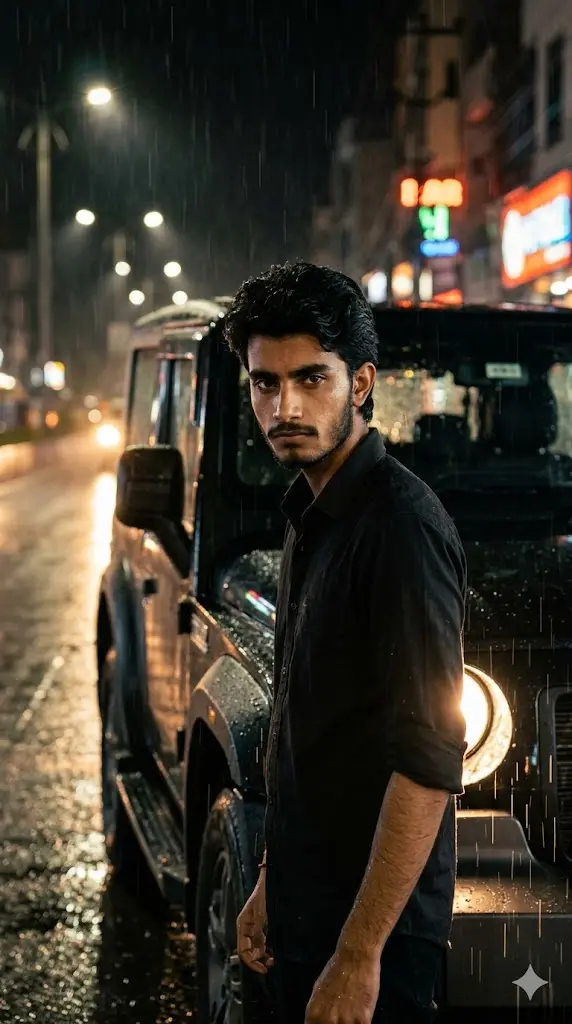
Maintain the exact facial identity of the uploaded user photo and transform the user into a hyper-realistic cinematic portrait standing beside a Mahindra Thar SUV on a rain-soaked road. The user wears a black shirt with rolled sleeves, showing a bold and intense personality. Raindrops fall naturally across the scene while reflections from street lights glow on the wet surface. The Thar headlights shine through the rain, creating dramatic lighting. The user looks directly at the camera with a serious expression while rain adds texture to the environment. Ultra-realistic skin detail, reflections, and cinematic lighting. Aspect ratio 9:16.
Royal Entry Thar Portrait
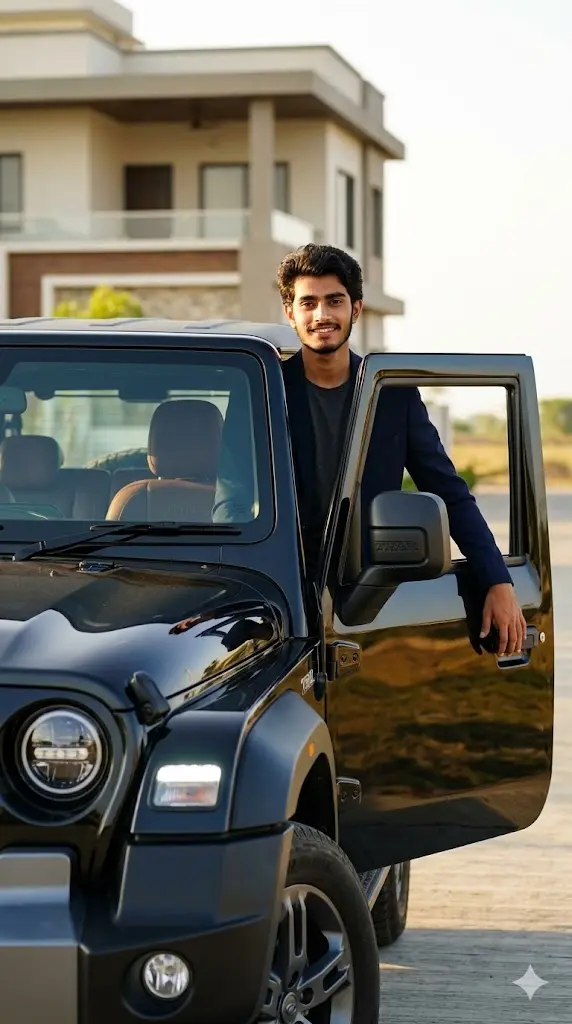
Maintain the exact facial identity of the uploaded user photo and transform the user into a hyper-realistic cinematic portrait stepping out of a premium-styled Mahindra Thar SUV. The user wears a stylish blazer over a casual outfit, giving a rich and powerful personality. The Thar is clean, glossy, and reflecting sunlight with luxury detailing. The background features a modern villa or open landscape with warm sunlight. The user looks toward the camera with a confident smile while one hand rests on the car door. Cinematic lighting enhances facial features and vehicle shine. Ultra-realistic photography. Aspect ratio 9:16.
Sunset Highway Thar Cinematic Shot
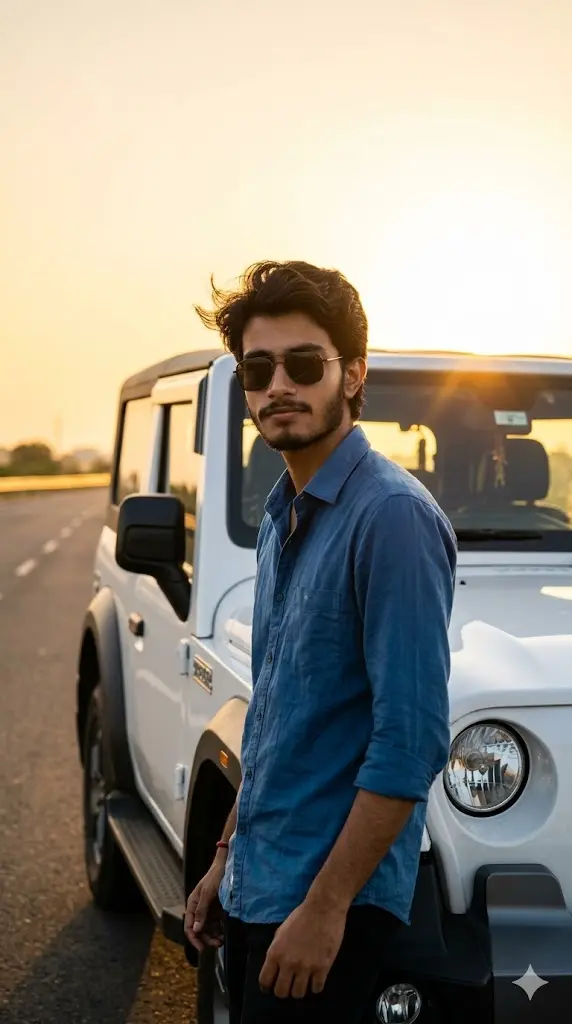
Maintain the exact facial identity of the uploaded user photo and transform the user into a hyper-realistic cinematic portrait standing beside a white Mahindra Thar SUV on an open highway during golden sunset fully visible behind the user. The user wears a casual shirt and sunglasses, showing a relaxed yet confident attitude. Warm sunlight creates glowing highlights across the face and vehicle while long shadows stretch across the road. The Thar reflects the sunset beautifully with realistic details. The user stands facing the camera with a calm expression while wind gently moves clothing and hair. Cinematic depth and ultra-realistic lighting. Aspect ratio 9:16.
Off-Road Legend Thar Hero Shot
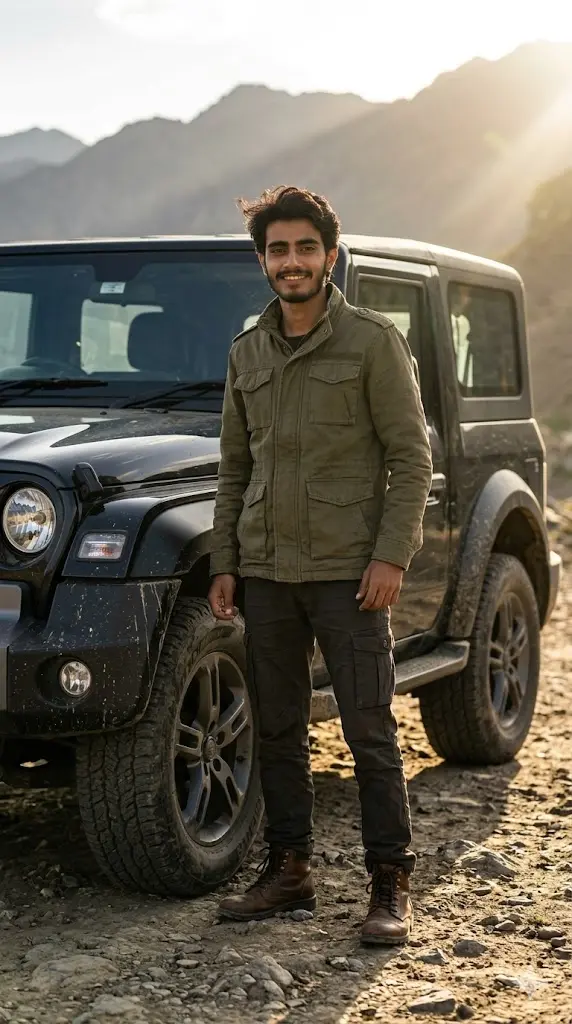
Maintain the exact facial identity of the uploaded user photo and transform the user into a hyper-realistic cinematic portrait standing proudly beside a Mahindra Thar SUV on a rough off-road terrain filled with rocks and dirt trails. The user wears a rugged outdoor outfit with boots, showing strength and adventure spirit. The Thar appears powerful with realistic mud textures and strong tires. Dramatic sunlight creates strong contrast and shadows across the scene. The user looks directly at the camera with a confident expression while wind adds natural motion to clothing. Ultra-realistic textures and cinematic depth. Aspect ratio 9:16.
Mountain Explorer Thar Portrait
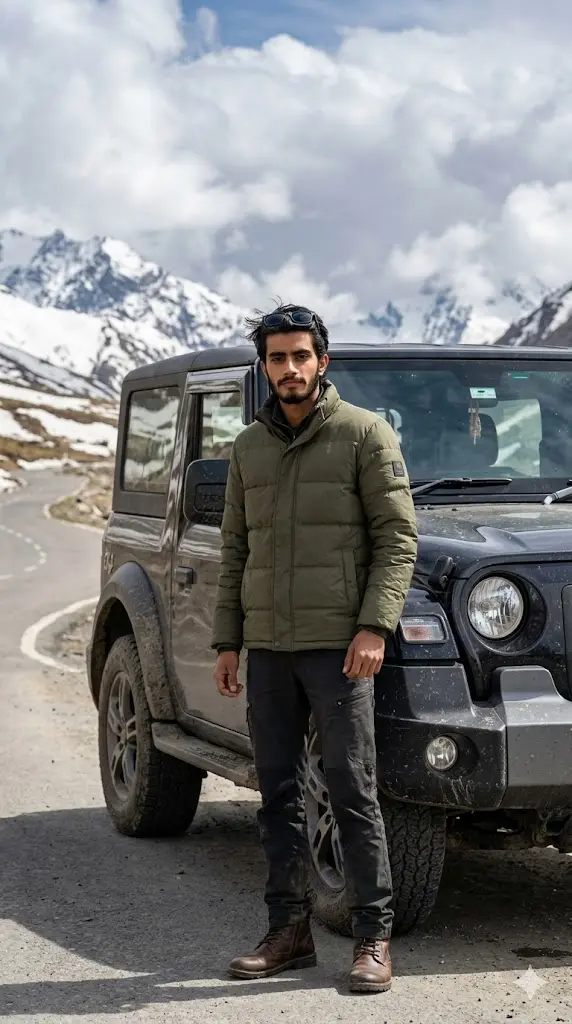
Maintain the exact facial identity of the uploaded user photo and transform the user into a hyper-realistic cinematic portrait standing beside a Mahindra Thar SUV on a rain-soaked road. The user wears a black shirt with rolled sleeves, showing a bold and intense personality. Raindrops fall naturally across the scene while reflections from street lights glow on the wet surface. The Thar headlights shine through the rain, creating dramatic lighting. The user looks directly at the camera with a serious expression while rain adds texture to the environment. Ultra-realistic skin detail, reflections, and cinematic lighting. Aspect ratio 9:16.
Forest Adventure Thar Portrait
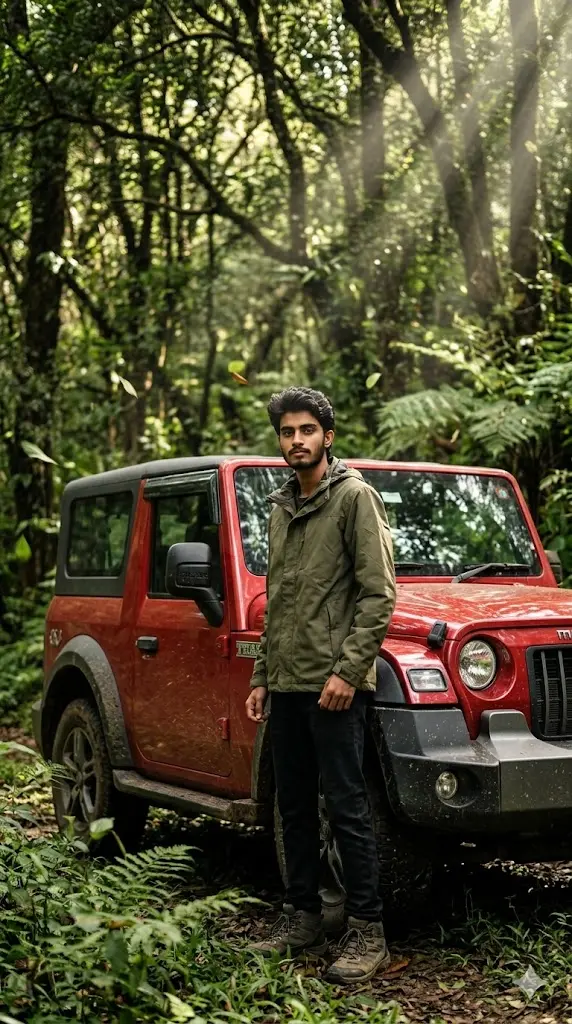
Maintain the exact facial identity of the uploaded user photo and transform the user into a hyper-realistic cinematic portrait standing beside a red Mahindra Thar SUV in a dense forest environment. The user wears a green jacket and boots, blending with the adventurous setting. Sunlight filters through trees creating natural light rays and shadows across the face and vehicle. The Thar appears slightly muddy with realistic off-road detailing. The user looks confidently toward the camera with a calm expression. Leaves move subtly in the wind while the background remains softly blurred for cinematic depth. Ultra-realistic textures and lighting. Aspect ratio 9:16.
How to Customize Thar Prompts Like a Pro
Most users just copy-paste prompts, but if you tweak a few words, you can create unlimited variations. Here are the most important things users usually want to change.
1. Thar Ka Color Kaise Change Kare?
Bahut simple hai 👇
Prompt me jaha “Mahindra Thar SUV” likha hai, uske aage ya piche color add kar do.
Example:
- “black Mahindra Thar SUV”
- “matte green Mahindra Thar SUV”
- “red off-road Mahindra Thar SUV”
- “glossy white Mahindra Thar with black roof”
💡 Pro Tip:
“matte”, “metallic”, “glossy”, “custom modified” jaise words add karne se output aur premium lagta hai.
2. Kya Thar Ki Photo Upload Karni Zaroori Hai?
Nahi. Bilkul nahi.
Ye prompts aise design kiye gaye hain ki AI khud Thar generate karega.
Lekin agar aap apni real Thar chahte ho:
✔ Aap apni Thar ki photo bhi upload kar sakte ho
✔ Prompt me likh do: “use the uploaded car image”
💡 Result:
- Without upload → AI generated Thar
- With upload → more personalized result
3. Background / Location Kaise Change Kare?
Aap kisi bhi prompt me location change kar sakte ho 👇
Replace environment with:
- “snow mountains”
- “Dubai luxury road”
- “Ladakh terrain”
- “rainy cyberpunk city”
- “village dusty road”
💡 Example edit:
“desert landscape” → “Himalayan snow mountains with fog”
4. Outfit & Style Kaise Change Kare?
Prompt me jo outfit diya hota hai usko directly replace kar sakte ho:
Examples:
- “black shirt” → “formal suit”
- “casual outfit” → “streetwear hoodie”
- “jacket” → “traditional kurta”
💡 Bonus Tip:
Add words like:
- “stylish”
- “luxury”
- “rugged”
- “celebrity style”
5. Friends Ya Group Kaise Add Kare?
Agar aap solo nahi, group photo chahte ho 👇
Prompt me add karo:
- “standing with 2 friends”
- “group of 3 people beside the Thar”
- “friends leaning on the car”
Aur multiple photos upload karo.
Important:
Maintain the exact facial identity of the uploaded user photo line ko modify karke likho:
“Maintain the exact facial identity of all uploaded people”
How to Use These Prompts in Gemini (Quick Guide)
- Gemini open karo (gemini.google.com)
- New chat start karo
- Apni photo upload karo
- Koi bhi Thar prompt copy karo
- Prompt paste karo
- Generate hone ka wait karo
- Image download karke DP ya post me use karo
FAQs
1. Kya mera face change ho jayega?
Nahi. Agar aap prompt me “Maintain the exact facial identity of the uploaded user photo” line ko use karte ho, to face bilkul same rahega.
2. Kya main apni real Thar add kar sakta hoon?
Haan, aap Thar ki photo upload karke prompt me mention kar sakte ho.
3. Best photo kaunsi hoti hai use karne ke liye?
Clear, front-facing, good lighting wali photo best results deti hai.
4. Kya main background aur clothes change kar sakta hoon?
Bilkul. Prompt ke andar simple words replace karke aap pura scene change kar sakte ho.
5. Result realistic kaise banega?
Ensure karo:
- high-quality photo ho
- full prompt use karo
- negative prompt agar hai to remove na karo
![14 Gemini Mirror Selfie Prompts for Boys [Copy Paste] Upload Your Photo & Get Your Desired Mirror Selfie](https://geminiaiprompt.online/wp-content/uploads/2026/02/Gemini-Mirror-Selfie-Prompts-for-Boys-1024x576.webp "14 Gemini Mirror Selfie Prompts for Boys [Copy Paste] Upload Your Photo & Get Your Desired Mirror Selfie Gemini Mirror Selfie Prompts for Boys")