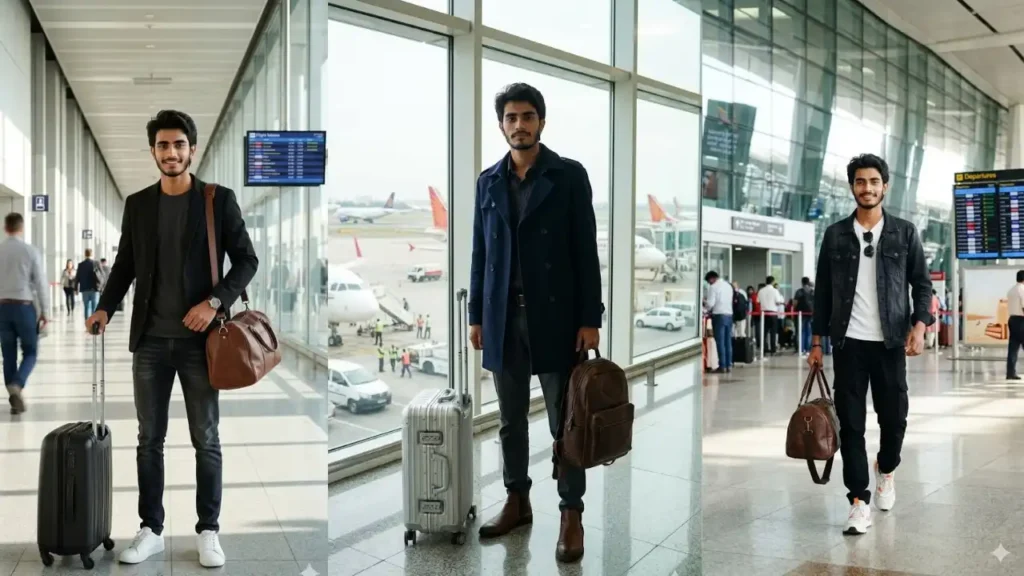
What if you could get a luxury airport photoshoot without ever stepping inside an airport? With Gemini AI, that’s now completely possible.
These prompts are designed to transform your normal photo into a full-body cinematic airport portrait where you look like a confident traveler, influencer, or even a celebrity walking through a premium terminal.
The best part is that your face doesn’t change. Gemini keeps your real identity intact while upgrading everything around you like outfit, lighting, environment, and even the entire airport scene.
From walking with a suitcase to standing near runway windows, these prompts create realistic, high-end travel visuals that look like professional photoshoots.
But the real magic happens when you start customizing the prompts based on your own style and preferences.
Airport Aircraft Stairs Travel Photo
This one stood out during testing because the airplane stairs added a strong real-world travel feeling. What I found was that adding small details like luggage equipment and airport workers helped Gemini understand the environment better. The final image looked like a genuine boarding moment captured before a flight.

Preserve the uploaded person’s real facial identity, natural expression, and original appearance while transforming the scene into a realistic airport travel photograph. Place the subject standing on the boarding stairs of a passenger airplane on the runway area. The airplane door, aircraft body, stairs, and airport ground operations should be clearly visible. The subject is wearing a casual travel outfit with a light shirt, trousers, and a small backpack, giving the feeling of starting a journey. The person looks directly at the camera with a relaxed natural expression. Include realistic airport workers, safety markings, luggage carts, and runway vehicles in the background without making them distracting. The image should look like a normal travel photo taken during daytime with realistic sunlight, natural colors, and true-to-life details. Avoid any cinematic styling, heavy editing, artificial glow, or background blur. Clear sharp face. Quality: 8K. Aspect ratio 3:4.
 Copy
Copy Join
JoinAirport Runway Plane Standing Portrait
I tested this prompt first because runway portraits are usually where AI tends to overdo the background. What I found was that clearly mentioning the parked airplane, airport equipment, and normal daylight helped Gemini create a much more realistic travel photo. The final result felt like an actual airport memory instead of a heavily edited AI image.

Use the uploaded photo as the identity source and preserve the person’s recognizable facial features, natural skin texture, hairstyle, body proportions, and authentic appearance. Create a realistic airport runway portrait where the subject is standing confidently in front of a large passenger airplane parked on the tarmac. The aircraft should be clearly visible behind the subject with realistic airport markings, stairs, ground vehicles, and runway equipment around the area. The subject wears a casual travel outfit such as a comfortable jacket, jeans, and sneakers while looking naturally toward the camera. The scene should feel like a real airport travel moment captured during daytime with normal sunlight and realistic shadows. Keep the face extremely clear and natural without changing facial structure. No cinematic effects, no artificial color grading, no dramatic lighting, no background blur. The environment should look like an actual airport runway photograph with realistic details. Clear sharp face. Quality: 8K. Aspect ratio 3:4.
Private Jet Runway Travel Portrait
I tested this prompt to see if Gemini could create a premium-looking scene without making it unrealistic. What I found was that keeping the outfit casual and avoiding luxury-style words produced a much more believable private aviation photo. The result looked like a real travel picture rather than an artificial celebrity edit.

IDENTITY PRESERVATION MODE — Keep the uploaded person’s facial identity completely recognizable while placing them in a realistic private jet runway environment. The subject stands beside a modern private aircraft parked at an airport with the plane door, stairs, runway markings, and surrounding aviation equipment visible. The person wears a simple but stylish travel outfit such as a casual blazer, plain shirt, and trousers while looking naturally at the camera. The scene should resemble a real airport arrival or departure photo taken by someone nearby. Include realistic details like aircraft wheels, service vehicles, airport staff in the distance, and open runway space. Keep the lighting natural like a normal daytime outdoor photograph with realistic skin tones and no dramatic effects. Do not add luxury filters, cinematic atmosphere, artificial sharpness, or blurred backgrounds. Maintain a natural travel photography feel. Clear sharp face. Quality: 8K. Aspect ratio 3:4.
Airport Shuttle Bus Runway Portrait
I wanted to test a less common airport scene, and this prompt produced one of the most natural-looking results. What impressed me was how the airport bus gave the image more authenticity. Instead of focusing only on the airplane, Gemini created a complete airport environment with realistic transportation details.

Use the uploaded image as the main identity reference and maintain the person’s authentic face, hairstyle, skin details, and realistic appearance. Create a realistic airport runway scene where the subject is standing beside an airport transport bus near parked airplanes. The bus should look like a real airport shuttle vehicle with visible windows, doors, and airport service markings. Large aircraft should appear in the background with runway lanes, ground staff, luggage equipment, and airport structures creating a believable travel environment. The subject wears casual airport fashion such as a hoodie, jacket, comfortable pants, and sneakers while facing the camera naturally. The image should feel like an everyday airport moment captured by a traveler, not a professional photoshoot. Use natural daylight, realistic shadows, and accurate colors without cinematic lighting or color grading. Keep all details sharp with no background blur. Clear sharp face. Quality: 8K. Aspect ratio 3:4
VIP Airport Walk Portrait

Maintain the exact facial identity of the uploaded user photo and transform the user into a hyper-realistic VIP traveler confidently walking through a luxury international airport terminal. The user wears a designer overcoat with premium travel fashion styling, luxury sunglasses, and an expensive leather bag, creating a successful celebrity traveler aesthetic. The environment should feel naturally photographed using a mid range smartphone camera with realistic airport lighting, natural skin detail, authentic reflections on polished floors, and cinematic motion blur in the background crowd. Large airport windows allow soft daylight to illuminate the face and clothing naturally. The user walks confidently toward the camera while maintaining a relaxed luxury vibe.Clear Sharp face. Quality: 8K. Aspect ratio 3:4. Half body close-up image
Luxury Airport Departure Portrait
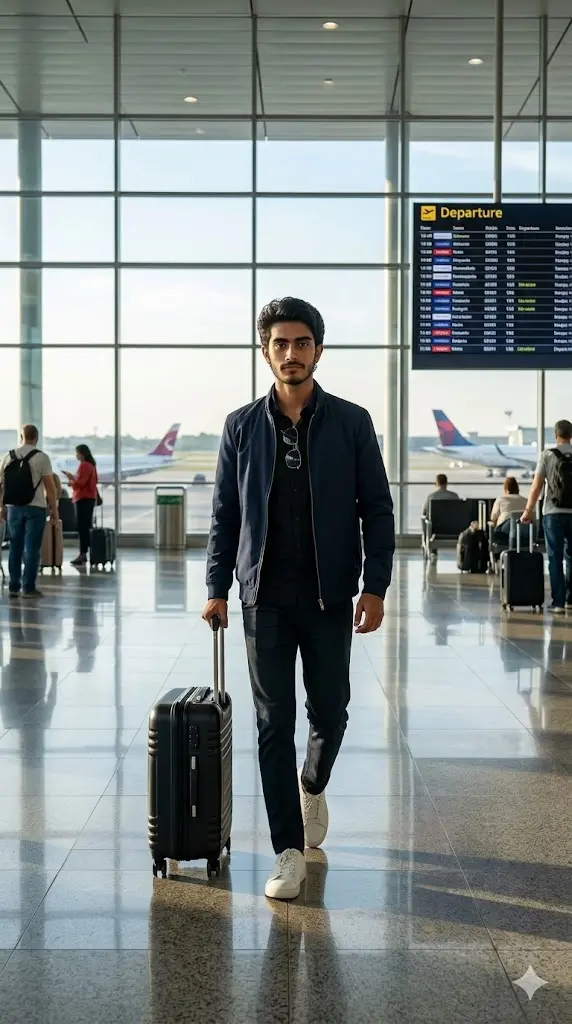
Maintain the exact facial identity of the uploaded user photo and transform the user into a hyper-realistic full body cinematic portrait standing inside a modern international airport departure terminal. The user is walking confidently toward the camera while pulling a stylish travel suitcase, wearing a premium travel outfit such as a fitted jacket, sunglasses, and clean sneakers that reflects a confident traveler personality. Large glass airport windows allow natural sunlight to illuminate the scene while airplanes are visible outside on the runway. The environment includes realistic airport details like departure boards, polished floors, reflections, and depth of field. Ultra-realistic lighting, skin texture, and full body composition designed for a cinematic travel poster. Aspect ratio 9:16.
Runway View Airport Portrait
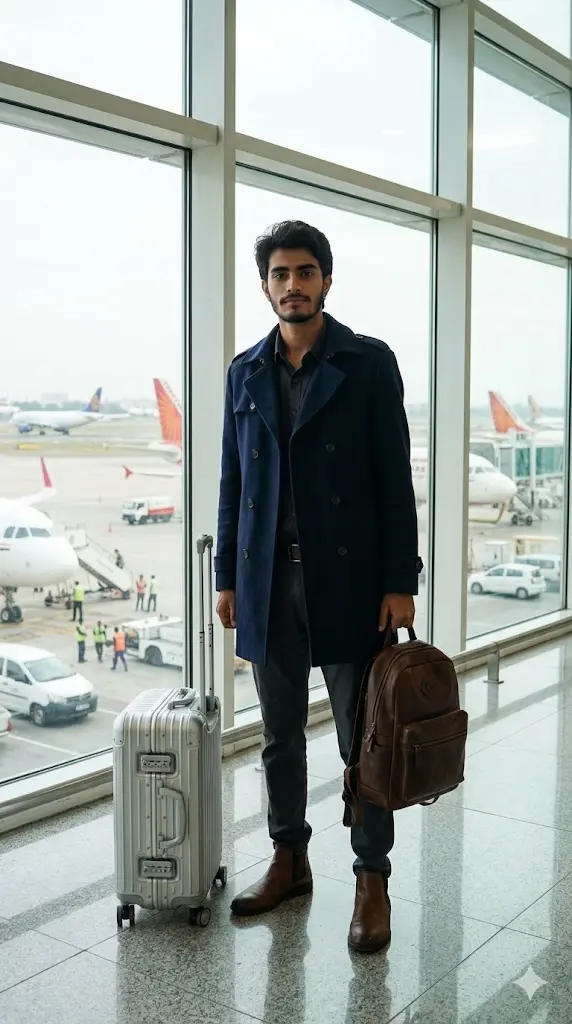
Maintain the exact facial identity of the uploaded user photo and transform the user into a hyper-realistic full body cinematic portrait standing near large airport glass windows overlooking airplanes on the runway. The user wears a modern travel outfit including a stylish coat, casual pants, and fashionable shoes, projecting a confident airport fashion look. Natural daylight enters through the windows creating soft cinematic lighting on the face and clothing. The user stands confidently facing the camera with luggage placed beside them while aircraft and airport vehicles are visible outside. Reflections on the polished floor enhance realism while the terminal environment feels active and premium. Ultra-realistic photography with cinematic depth and travel atmosphere. Aspect ratio 9:16.
Airport Walking Travel Influencer Shot
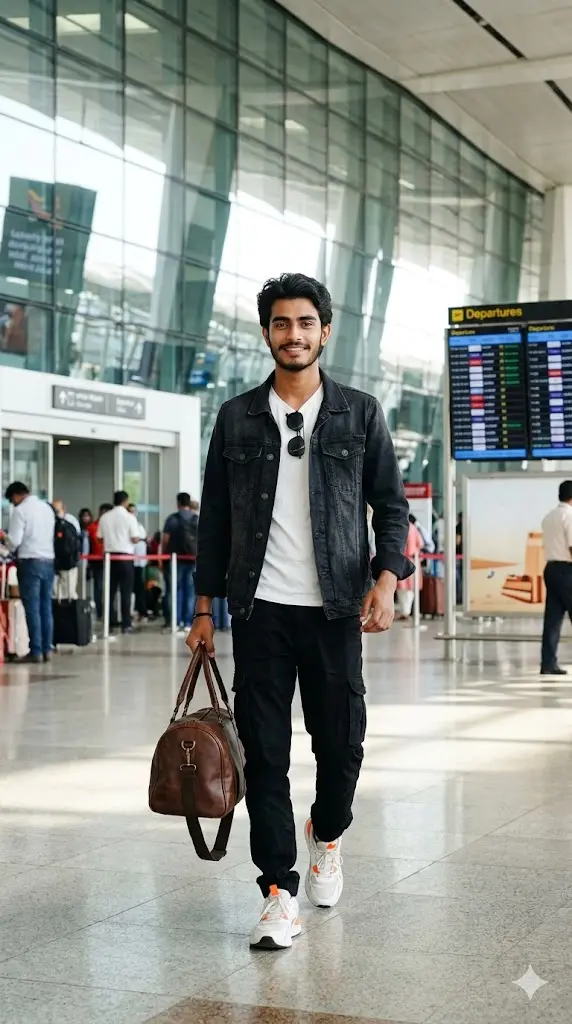
Maintain the exact facial identity of the uploaded user photo and transform the user into a hyper-realistic full body portrait walking through a large international airport terminal like a travel influencer. The user confidently walks toward the camera holding a travel bag while wearing a stylish airport outfit with sunglasses, casual jacket, and trendy sneakers. Bright natural light from large glass panels illuminates the environment while airport architecture creates a cinematic background. Departure boards, travelers in the distance, and polished floors enhance the realism of the scene. The user’s clothing moves naturally as they walk, creating motion realism. The overall style feels like a professional travel photoshoot captured inside a busy modern airport. Aspect ratio 9:16.
Business Class Airport Look
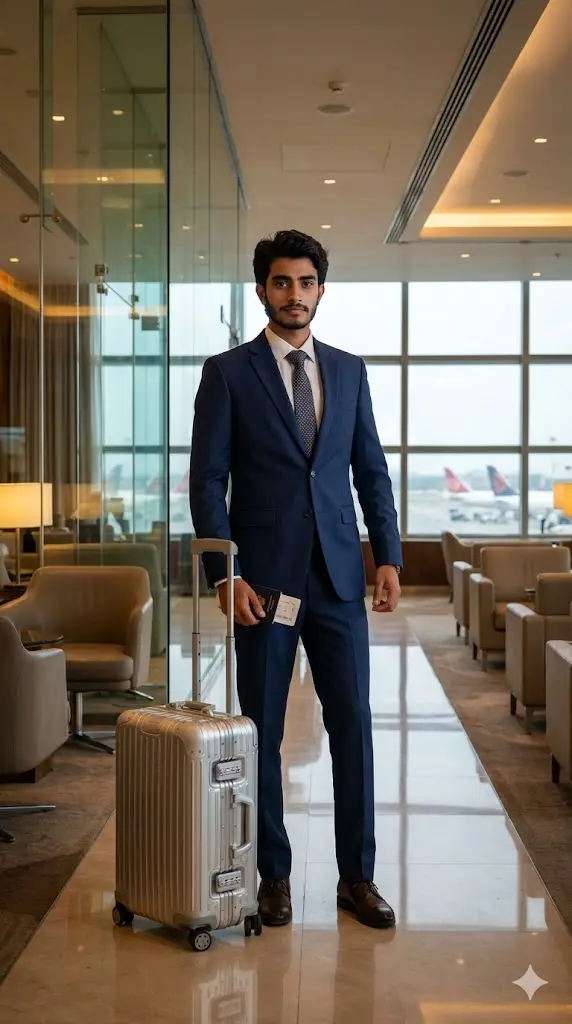
Maintain the exact facial identity of the uploaded user photo and transform the user into a hyper-realistic full body portrait standing inside a premium airport lounge area. The user wears a formal travel outfit such as a stylish suit or luxury airport fashion attire, representing a confident business traveler ready for a flight. The environment includes modern seating areas, warm lighting, glass architecture, and aircraft visible outside through large windows. The user stands confidently facing the camera holding a passport and suitcase, creating a cinematic travel lifestyle moment. Reflections on polished surfaces and soft depth of field add realism. Ultra-realistic textures and lighting make the scene feel like a high-end airport photography shoot. Aspect ratio 9:16.
Boarding Gate Travel Portrait
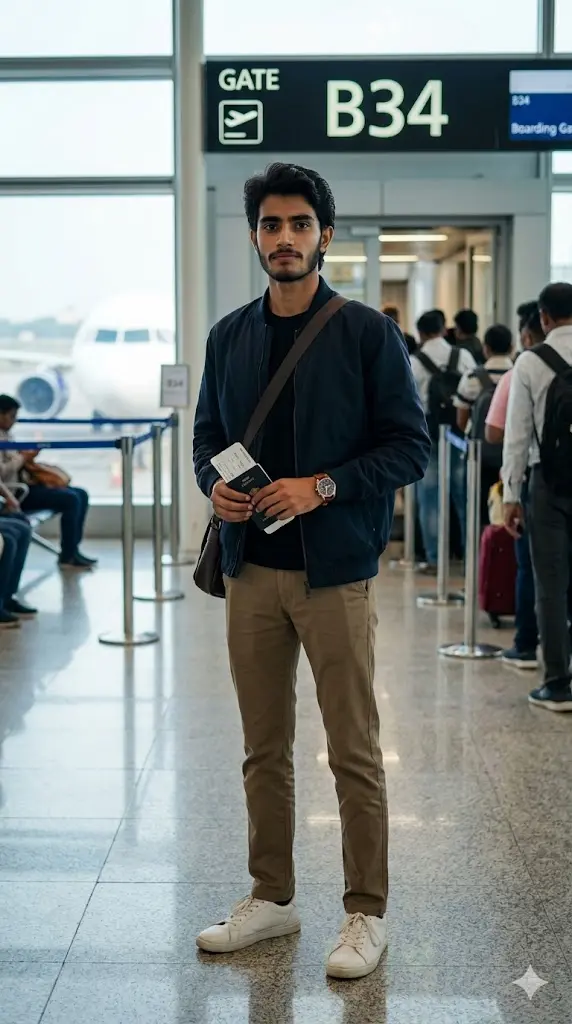
Maintain the exact facial identity of the uploaded user photo and transform the user into a hyper-realistic full body portrait standing near an airport boarding gate area. The user holds a passport and boarding pass while wearing a fashionable airport travel outfit, creating a stylish traveler look. Behind the user, the boarding gate sign, passengers, and aircraft visible through the windows add realistic context to the scene. Natural airport lighting highlights the face and clothing while polished floors create subtle reflections. The user stands confidently looking toward the camera with relaxed posture. Cinematic depth of field and ultra-realistic photography make the scene look like a professional airport photoshoot. Aspect ratio 9:16.
Airport Fashion Editorial Shot
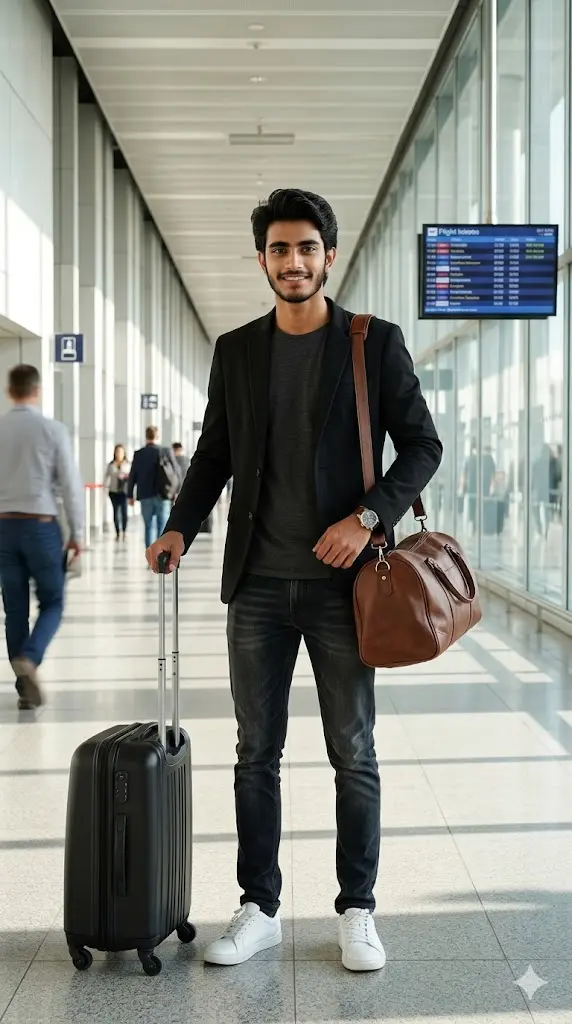
Maintain the exact facial identity of the uploaded user photo and transform the user into a hyper-realistic full body portrait styled like an airport fashion editorial photoshoot. The user stands confidently inside a bright terminal hallway wearing a stylish modern travel outfit with strong fashion aesthetics, creating a bold look. Long airport corridors and architectural lines create depth while natural light fills the environment. The user holds luggage beside them and faces the camera confidently. Subtle motion blur of travelers in the background adds realism and activity. Ultra-realistic textures, lighting, and clothing details create a premium editorial photography style portrait. Aspect ratio 9:16.
Can I Change the Type of Bag or Luggage?
Yes, and this is one of the easiest customizations.
Just replace or edit the luggage description inside the prompt:
Examples:
- “luxury leather suitcase”
- “minimal black cabin trolley bag”
- “designer travel luggage”
- “backpack instead of suitcase”
Words like “premium”, “luxury”, “minimal”, “designer” make your output look more high-end and realistic.
🕶️ Can I Add Sunglasses or Accessories?
Absolutely. Accessories can completely change your vibe.
You can add:
- “wearing black sunglasses”
- “aviator sunglasses with reflective lenses”
- “luxury wristwatch”
- “neck chain or bracelet”
Tip: If you want a celebrity airport look, sunglasses + confident posture works best.
Can I Change Clothes or Outfit Style?
Yes, and this is where you can get creative.
Just replace the outfit part in the prompt:
Examples:
- “formal suit” for business look
- “hoodie and sneakers” for street style
- “airport fashion outfit” for influencer vibe
- “traditional outfit” for unique style
Can I Add Friends or Travel Partner?
Yes, you can turn solo prompts into group shots.
Just edit the prompt:
- “standing with one friend”
- “group of two or three people walking together”
Also upload multiple photos.
Can I Change Airport Type or Location?
Yes, you can create different vibes easily.
Replace with:
- “Dubai luxury airport”
- “night airport with neon lights”
- “private jet terminal”
- “Indian airport terminal”
FAQs
Kya AI mera face change kar dega?
Nahi. first line use karne se aapka face bilkul same rahega.
Kya mujhe airport ki photo upload karni padegi?
Nahi. AI automatically airport generate karta hai.
Kya main alag-alag poses try kar sakta hoon?
Haan, aap prompt me “walking”, “standing”, “holding bag” jaise words change kar sakte ho.
Result realistic kaise banega?
High-quality photo use karo, full prompt paste karo, aur unnecessary editing avoid karo.
![14 Gemini Mirror Selfie Prompts for Boys [Copy Paste] Upload Your Photo & Get Your Desired Mirror Selfie](https://geminiaiprompt.online/wp-content/uploads/2026/02/Gemini-Mirror-Selfie-Prompts-for-Boys-1024x576.webp "14 Gemini Mirror Selfie Prompts for Boys [Copy Paste] Upload Your Photo & Get Your Desired Mirror Selfie Gemini Mirror Selfie Prompts for Boys")