When I first started creating ethereal AI photo prompts in Gemini, I noticed a common problem.
Most prompts completely changed the user’s face, clothes, background, or even the original mood of the image. Instead of enhancing the photo, Gemini often generated something entirely different.
My goal was different. I wanted an effect that felt like a premium cinematic filter rather than a full image transformation.
After testing dozens of lighting combinations, hidden backlight techniques, bloom settings, atmospheric haze effects, glow intensity levels, and contrast adjustments, I found a formula that consistently produced realistic ethereal portraits without changing the user’s actual appearance.
One of the biggest challenges I faced was creating a strong heavenly glow while keeping the subject completely natural. Too much bloom made faces look fake, while too little lighting made the effect barely visible.
I also discovered that dark backgrounds create significantly stronger ethereal contrast compared to bright backgrounds, which is why these prompts use deep cinematic black environments combined with powerful invisible backlighting.
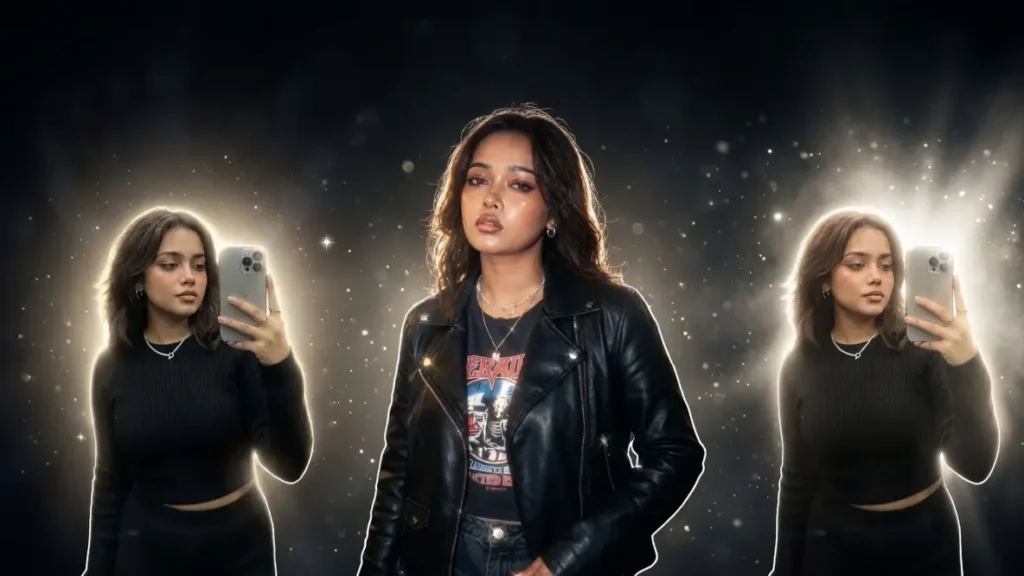
The result is an effect that preserves the user’s identity, clothes, pose, and expression while adding dramatic luxury lighting, radiant halos, glowing particles, and dreamlike atmosphere. These are the same techniques I personally use when creating premium ethereal edits with Gemini AI.
Universal Ethereal Light Revival Filter Prompt

Apply a premium ethereal lighting effect to the uploaded photo while preserving the user’s face, clothes, hairstyle, pose, body proportions, skin texture, expression, and all original details exactly as they are. Do not alter facial features, outfit design, or composition.Transform the entire background into a deep luxurious dark environment while maintaining the subject exactly unchanged. The background should fade into rich black tones with subtle cinematic depth and no visible distractions.Add powerful soft golden-white backlighting hidden behind the subject, creating a luminous halo around the hair, shoulders, and body outline. Create intense glow diffusion around bright areas with smooth bloom, elegant lens glow, and radiant highlight scattering. Add floating light particles, tiny glowing dust specks, dreamy bokeh sparkles, and subtle star-like reflections.Enhance facial highlights naturally while keeping realistic skin texture. Create soft volumetric light wrapping around the subject with luxurious cinematic contrast. The final image should feel heavenly, expensive, emotional, and dreamlike with a completely dark premium background and radiant ethereal illumination.
 Copy
Copy Join
JoinCinematic Black Background Angelic Light Effect

Apply an ultra-realistic ethereal enhancement to the uploaded image while preserving the user’s exact identity, face, clothing, hairstyle, posture, body shape, and original image details without any modification.Convert the background into a smooth deep-black cinematic backdrop with subtle atmospheric depth. No visible environment should remain. The focus must stay entirely on the subject.Add a hidden bright white-gold light source positioned behind the subject. The actual light source must never be visible. Only the resulting glow should appear around the silhouette, creating a premium angelic halo effect. Add luminous edge lighting around the hair strands, face outline, shoulders, and clothing contours.Introduce soft cinematic bloom, radiant light leakage, glowing particles, dreamy haze, lens diffusion, and smooth highlight transitions. Add elegant sparkles on reflective surfaces while maintaining realism. The image should resemble a luxury editorial portrait captured using expensive cinema lighting with a completely dark background and intense ethereal atmosphere
Dark Dreamcore Ethereal Filter

Apply a high-end dreamcore ethereal lighting filter to the uploaded photo while preserving every original detail including face, clothes, hairstyle, expression, pose, body proportions, and image framing.Replace the background with a rich black cinematic atmosphere. Add a hidden ultra-bright light source positioned behind the subject, creating powerful luminous edge lighting and a glowing aura surrounding the entire body. Generate soft radiant beams passing through illuminated mist and haze. Create beautiful white-gold reflections across skin and clothing while maintaining realistic textures.Add dreamy bokeh particles, glowing floating sparkles, atmospheric diffusion, cinematic bloom, soft light leaks, highlight flares, and luxury editorial glow. The subject should remain perfectly sharp while the surrounding light softly melts into darkness. Use strong contrast, deep shadows, radiant highlights, and heavenly illumination for an emotional dreamlike look. The final result should feel mystical, elegant, cinematic, and visually unforgettable.
Can Boys Use These Ethereal Gemini AI Prompts?
Absolutely. While many people associate ethereal edits with dreamy female portraits, I specifically tested these prompts on male portraits as well.
In my experience, boys often get even stronger results because the dramatic backlighting creates a powerful cinematic look around the jawline, hair, shoulders, and clothing edges.
Whether the photo is casual, streetwear, formal, gym, biker, or luxury fashion themed, the ethereal effect works surprisingly well without making the image look overly soft or feminine.
Will Gemini Change My Face Or Facial Features?
This was one of my biggest concerns when creating these prompts. During early testing, Gemini occasionally altered facial structure, skin tone, or facial details when lighting instructions became too aggressive.
To solve this, I intentionally designed these prompts to prioritize facial preservation first and visual effects second. In most cases, Gemini keeps the face highly accurate because the prompts repeatedly emphasize maintaining facial identity, expressions, and proportions. The goal is enhancement, not transformation.
Will Gemini Change My Clothes After Applying The Effect?
In my testing, Gemini is less likely to modify clothing when the prompt clearly states that outfits must remain unchanged. The ethereal effect primarily affects lighting, highlights, reflections, glow, and atmosphere rather than redesigning clothing.
However, extremely low-quality photos sometimes give Gemini less detail to work with, which can occasionally introduce small fabric changes. Higher-quality source photos usually preserve clothing much more accurately.
Can I Keep My Original Background Instead Of Using A Dark Background?
Yes. The dark background version is simply my preferred setup because it creates stronger contrast and more dramatic glow effects.
If you want to keep the original background, remove the black background instruction and replace it with:
“Preserve the original background exactly while applying the ethereal lighting effect.”
I have tested both versions, and the original background option works well for nature, streets, architecture, and indoor photography.
Why Does A Black Background Create A Stronger Ethereal Effect?
After testing multiple lighting environments, I noticed that black backgrounds amplify perceived brightness dramatically.
When bright halos, bloom, and rim lights are surrounded by darkness, the glow appears more intense and cinematic. The human eye naturally focuses on the illuminated subject because there are fewer competing visual elements.
This is the same principle used in luxury fashion campaigns, movie posters, and premium portrait photography.
What Happens If My Original Photo Is Taken During Daylight?
Daylight photos actually work very well.
In many of my tests, Gemini successfully converted bright daytime images into cinematic ethereal portraits by enhancing highlights and creating artificial atmospheric depth. The effect may appear softer than nighttime photos, but the overall glow remains highly visible.
For best results, use photos with clear facial visibility and good exposure.
Will The Ethereal Effect Work On Full Body Photos?
Yes, and some of my favorite results came from full-body images.
Full-body photos allow Gemini to create a complete luminous outline around the entire silhouette. This often produces stronger visual impact because the halo extends from head to toe rather than being limited to the face and shoulders.
Standing poses, walking shots, fashion photography, and cinematic street portraits tend to perform particularly well.
How I Keep AI Faces Looking Natural Instead Of Overprocessed
One lesson I learned quickly was that excessive beauty enhancements destroy realism.
Instead of requesting smooth skin, flawless textures, or beauty filters, I focus on preserving natural skin details while enhancing only the lighting. Real pores, natural shadows, and authentic facial textures make the final image feel far more professional.
The glow should enhance the subject, not hide them.
My Favorite Lighting Settings For Luxury Ethereal Portraits
After extensive testing, my preferred combination includes:
- Hidden backlight behind the subject
- Strong white-gold rim lighting
- Soft atmospheric haze
- Medium cinematic bloom
- Subtle floating particles
- Controlled lens diffusion
- High contrast shadows
- Warm highlight reflections
This combination consistently produces a premium luxury portrait look without overwhelming the image.
How I Make Glow Effects Look Premium Instead Of Artificial
The difference between a premium glow and a fake glow usually comes down to restraint.
Rather than flooding the entire image with brightness, I concentrate illumination around the edges of the subject. Realistic glow behaves like actual light. It gradually fades into surrounding shadows instead of creating harsh glowing outlines.
I also prefer layering multiple subtle glow effects rather than relying on a single extremely bright effect.
Can I Increase The Glow Intensity Even Further?
Yes.
If you want a stronger heavenly appearance, you can increase instructions related to:
- Halo intensity
- Bloom strength
- Volumetric light rays
- Atmospheric haze
- Floating sparkles
- Rim light brightness
I recommend increasing these gradually. Excessive values often reduce realism and make the image look more AI-generated.
Do These Prompts Work Better In Gemini Than Other AI Tools?
Based on my testing, Gemini handles atmospheric lighting surprisingly well.
What impressed me most was Gemini’s ability to generate natural-looking volumetric light rays and luminous edge lighting while preserving facial identity. Other tools may offer stronger stylization, but Gemini often delivers a better balance between realism and cinematic enhancement.
This balance is exactly why I created these prompts specifically around Gemini’s strengths.
How I Tested Different Bloom And Halo Effects For Realistic Results
I spent a significant amount of time comparing different combinations of bloom, haze, glow, and backlighting.
Many early versions looked unrealistic because the halo was too sharp or the bloom covered facial details. The best results came from softer halos combined with gradual light falloff.
The final prompts use this refined approach, allowing the glow to feel natural while still remaining visually impressive.
My Recommended Camera Angles For Ethereal AI Portraits
Through testing, I found these angles produce the strongest ethereal effect:
- Eye-level portraits for balanced cinematic results
- Slight low-angle shots for heroic, angelic appearances
- Three-quarter profile angles for dramatic rim lighting
- Full-body standing poses for complete silhouette glow
- Walking portraits for cinematic storytelling
These angles give Gemini more opportunities to create beautiful edge lighting and atmospheric depth around the subject.