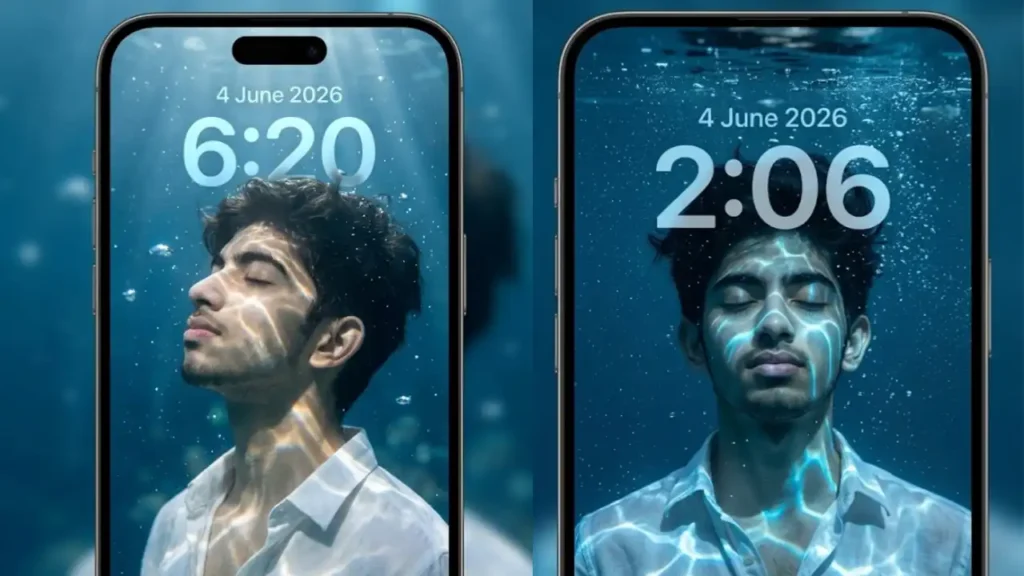
One thing that I noticed in this Viral Underwater Instagram AI Photo trend is that most prompts generated generic underwater portraits but failed to recreate the premium iPhone lock screen aesthetic.
The biggest challenge I faced was getting realistic underwater lighting, natural water reflections on the skin, and properly integrated lock screen elements such as the large clock, date, flashlight button, and camera button.
To improve the results, I tested dozens of Gemini AI photo editing prompts using different lighting setups, underwater environments, typography placements, and lock screen layouts.
After multiple rounds of testing, I found that realistic water caustics, floating bubbles, cinematic blue color grading, and correctly positioned smartphone UI elements make the biggest difference in creating a wallpaper that actually looks like a real iPhone lock screen.
In this guide, I am sharing the exact Gemini AI prompts that I personally tested and refined. These prompts are designed to preserve facial identity while transforming an ordinary photo into a viral underwater lock screen wallpaper with realistic lighting, premium aesthetics, and professional smartphone wallpaper quality
Underwater Lock Screen Wallpaper (Side Profile Version)

Transform the uploaded user into a premium underwater smartphone lock screen wallpaper. The user is submerged underwater with eyes gently closed, head tilted slightly upward in a peaceful side profile pose. Wet hair floating naturally in water, calm facial expression, realistic skin texture, and detailed facial features preserved exactly.The user is wearing a partially unbuttoned white shirt with soft fabric movement underwater. Bright underwater caustic light patterns are projected across the face, neck, chest, and shirt, creating realistic shimmering reflections. Deep blue aquatic environment with floating bubbles, suspended particles, subtle underwater haze, and cinematic volumetric light rays descending from the water surface above.Add an oversized translucent iPhone style clock at the top center displaying “6:20” in huge semi transparent typography. The numbers should blend naturally with the underwater environment. Place subtle date text “4 June 2026” above the clock in clean modern lock screen typography. Don’t duplicate or add any other text.At the bottom create realistic transparent glassmorphism lock screen controls including a flashlight icon on the left and camera icon on the right. Add a small home indicator bar at the bottom center. Keep everything contained inside a premium smartphone frame with rounded corners and thin black bezels. Ultra realistic, luxury wallpaper aesthetic, high contrast underwater lighting, photorealistic reflections, cinematic color grading, wallpaper quality.
 Copy
Copy Join
JoinUnderwater Lock Screen Wallpaper (Front Portrait Version)

Transform the uploaded user into an ultra realistic underwater phone lock screen wallpaper. The user is floating underwater facing slightly upward toward the camera with eyes fully closed and a peaceful dreamy expression. Preserve exact facial identity while making the portrait look cinematic and premium.The user wears a wet white shirt opened slightly at the collar. Strong underwater caustic lighting creates glowing liquid patterns across the cheeks, forehead, neck, chest, and clothing. Thousands of tiny bubbles rise around the face and hair. Hair floats naturally with realistic underwater movement. Rich deep blue ocean tones, crystal clear water, cinematic depth, floating particles, and dramatic underwater atmosphere.Place large semi transparent lock screen typography over the portrait showing “2:06” in huge modern smartphone font. Place subtle date text “4 June 2026” above the clock in clean modern lock screen typography. Don’t duplicate or add any other text. The typography should feel integrated into the wallpaper rather than pasted on top.At the bottom add realistic transparent glass lock screen buttons for flashlight and camera with soft reflections and blur effects. Include a small home indicator bar. The entire composition must appear inside a realistic smartphone lock screen frame with rounded corners. Luxury iPhone wallpaper style, ultra detailed underwater reflections, cinematic blue color grading, premium lighting, realistic water physics, viral social media wallpaper aesthetic.
My Process For Creating Realistic Water Reflection Effects
The biggest difference between an average underwater AI image and a premium looking wallpaper is the quality of the water reflections. In my testing, I found that simply asking Gemini for an underwater portrait is not enough.
Instead, I specifically describe underwater caustic lighting patterns. These are the moving light reflections created when sunlight passes through water. When properly generated, these reflections naturally wrap around the face, neck, shoulders, and clothing.
I also add details about floating particles, bubbles, volumetric light rays, and deep blue aquatic color grading. These small elements help create depth and realism. Without them, the image often feels flat and artificial.
Another trick I personally use is keeping the light source above the subject. This mimics how natural sunlight behaves underwater and creates much more realistic highlights and shadows.
Can Girls Use These Underwater Lock Screen Wallpaper Prompts?
Absolutely. Although many examples online feature male portraits, these prompts work equally well for girls. The underwater lighting, water reflections, lock screen typography, and smartphone UI effects are not tied to any specific gender.
I have tested similar prompts using female portraits, and the results often look even more elegant because flowing hair and fabric movement can enhance the underwater aesthetic. Long hair naturally interacts with the water environment, creating additional realism and visual appeal.
If you are using a female photo, you can keep the original white shirt style or replace it with dresses, tops, sarees, or other outfits while maintaining the same underwater atmosphere.
Do These Underwater Wallpaper Prompts Work Better In Gemini Or ChatGPT?
Based on my testing, Gemini currently performs very well when it comes to preserving facial identity and following detailed visual instructions. It is particularly effective at recreating smartphone lock screen layouts and maintaining realistic portrait quality.
However, the final result depends heavily on prompt quality. A well structured prompt usually matters more than the AI model itself. When I compared similar underwater wallpaper prompts, both Gemini and ChatGPT were capable of producing strong results, but Gemini often followed lock screen design instructions more consistently.
My recommendation is simple. If you already use Gemini for AI photo editing, these prompts should work extremely well. The key is providing detailed instructions about lighting, water effects, typography placement, and UI elements.
Can I Replace The White Shirt With Another Outfit?
Yes. The white shirt is popular because it reflects underwater lighting exceptionally well and makes water caustic effects more visible. This is one reason why many viral underwater wallpapers feature white clothing.
That said, the outfit can easily be customized. You can replace the white shirt with a black shirt, hoodie, suit, jacket, casual t shirt, traditional outfit, or even luxury fashion clothing.
The only thing I recommend is making sure the prompt still includes realistic underwater fabric movement and water reflections. These details help maintain the premium underwater aesthetic regardless of the outfit you choose.
Can I Create A Full Body Underwater Lock Screen Wallpaper?
Yes, and in many cases full body underwater wallpapers can look even more cinematic. Instead of focusing only on the face and upper torso, a full body composition allows Gemini to showcase floating clothing, underwater movement, and environmental depth.
When creating a full body wallpaper, I usually specify realistic body positioning, underwater posture, fabric flow, floating bubbles, and strong light rays from above. These details help fill the larger frame and make the wallpaper feel immersive.
Keep in mind that full body compositions require more space for both the portrait and lock screen elements. I recommend leaving enough empty area near the top for the clock and date while keeping the flashlight and camera buttons clearly visible at the bottom.
This ensures the final wallpaper still feels like a realistic smartphone lock screen rather than a standard underwater photograph.