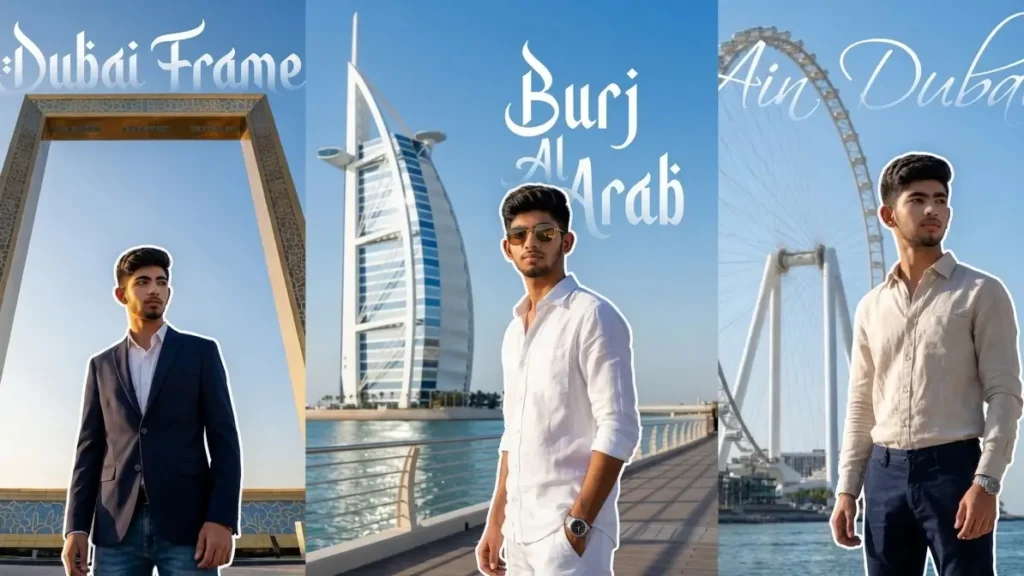
Dubai is known for its larger-than-life architecture, luxury lifestyle, and world-famous landmarks.
But what if you could place yourself right in front of these iconic locations, looking like you actually traveled there for a premium photoshoot?
With Gemini AI and the right prompts, you can transform your simple photo into a high-end Dubai tourist portrait featuring places like Burj Al Arab, Atlantis, Dubai Frame, and more.
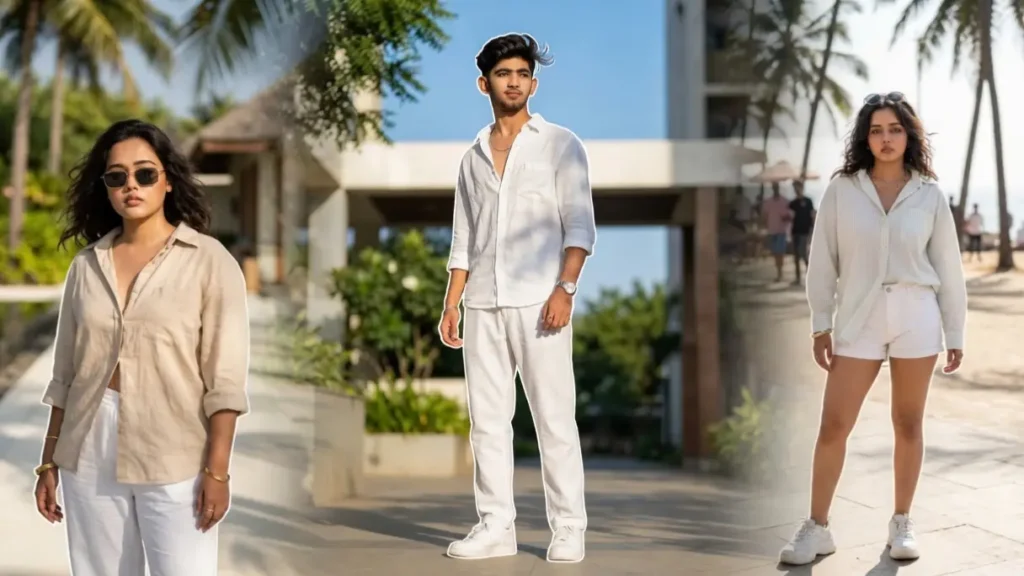
These prompts don’t just generate random backgrounds they are designed to preserve your real face while placing you in ultra-realistic environments with cinematic lighting, luxury outfits, and sharp architectural details.
What makes these prompts even more unique is the addition of beautiful white calligraphy text behind you, displaying the name of the location with a soft fading effect.
This gives your image a travel-poster vibe, making it perfect for social media, DPs, or even personal branding.
Prompt 1: Burj Al Arab Luxury Arrival Portrait

Maintain the exact facial identity of the uploaded user photo and transform the user into a hyper-realistic luxury portrait standing confidently in front of the iconic Burj Al Arab, with its sail-shaped structure rising sharply in the background. The user wears a premium all-white outfit with sunglasses, reflecting elite vacation energy. The camera angle is slightly low and side-facing to create a strong 3D cinematic presence. Bright sunlight highlights the architecture, ocean reflections, and facial features with crisp clarity. Behind the user, add elegant white calligraphy text “Burj Al Arab” with a soft fading effect blending into the sky. No blur, ultra-detailed textures and lighting.Clear Sharp face. Quality: 8K. Aspect ratio 3:4. Add a 8px watermark text ‘geminiaiprompt.online’ on bottom left side of image in cursive writing. No extra or duplicate text
 Copy
Copy Join
JoinPrompt 2: Ain Dubai Skyline

Maintain the exact facial identity of the uploaded user photo and transform the user into a hyper-realistic cinematic portrait standing near the giant observation wheel Ain Dubai, with the skyline and waterfront clearly visible. The user wears a premium casual luxury outfit, relaxed yet confident. The camera angle is slightly low and from the side, creating a strong 3D perspective with the massive wheel rising behind. Bright natural sunlight enhances reflections on water and structures while keeping facial details sharp. Behind the user, add elegant white calligraphy text “Ain Dubai” with a soft fading effect blending into the sky. No blur, ultra-detailed realism.Clear Sharp face. Quality: 8K. Aspect ratio 3:4. Add a 8px watermark text ‘geminiaiprompt.online’ on bottom left side of image in cursive writing.
Prompt 3: Dubai Frame Golden Perspective Portrait

Maintain the exact facial identity of the uploaded user photo and transform the user into a hyper-realistic portrait standing near the massive Dubai Frame, perfectly aligned in the background creating a grand symmetrical composition. The user wears a modern stylish outfit, standing confidently while slightly turned toward the camera. The angle is centered and slightly low, giving a powerful 3D perspective with the frame towering above. Bright golden sunlight reflects off the structure and enhances facial details. Behind the user, add white calligraphy text “Dubai Frame” with a smooth fading effect blending into the sky. Ultra-clear environment, no blur, high realism.Clear Sharp face. Quality: 8K. Aspect ratio 3:4. Add a 8px watermark text ‘geminiaiprompt.online’ on bottom left side of image in cursive writing.
Prompt 4: Atlantis The Palm Royal Entry Shot

Maintain the exact facial identity of the uploaded user photo and transform the user into a hyper-realistic cinematic portrait standing in front of the grand entrance of Atlantis The Palm, surrounded by luxury architecture and palm-lined pathways. The user wears a stylish luxury outfit with sunglasses, expressing confidence and richness. The camera captures from a slightly behind angle while the user turns toward the camera, creating a layered 3D depth effect. Warm sunlight enhances textures of the building and skin. Behind the user, include elegant white calligraphy text “Atlantis” with a soft fading glow merging into the structure. No blur, sharp realistic environment.Clear Sharp face. Quality: 8K. Aspect ratio 3:4. Add a 8px watermark text ‘geminiaiprompt.online’ on bottom left side of image in cursive writing.
Prompt 5: Desert Royal SUV Luxury Shot

Maintain the exact facial identity of the uploaded user photo and transform the user into a hyper-realistic luxury portrait standing in the Dubai desert beside a premium SUV, golden dunes stretching infinitely behind. The user wears a stylish beige desert outfit with sunglasses, reflecting a royal explorer vibe. The camera captures from slightly behind while the user looks toward the camera, creating a layered 3D perspective. Golden sunlight casts dramatic shadows and highlights across sand textures and face. Add subtle white calligraphy “Royal” in the sky area. No blur, full environmental clarity. Ultra-realistic textures and depth.Clear Sharp face. Quality: 8K. Aspect ratio 3:4. Add a 8px watermark text ‘geminiaiprompt.online’ on bottom left side of image in cursive writing.
Prompt 6: Palm Jumeirah Luxury Balcony View

Maintain the exact facial identity of the uploaded user photo and transform the user into a hyper-realistic portrait standing on a luxury balcony overlooking Palm Jumeirah, with ocean and villas clearly visible. The user wears a white luxury resort outfit, relaxed yet confident. The camera angle is slightly behind the user, capturing both the face turned back toward camera and vast scenery for a strong 3D feel. Lighting is bright, natural, and evenly spread with no blur. Add subtle sunlight reflections on glass railing. Ultra-detailed environment and textures.Clear Sharp face. Quality: 8K. Aspect ratio 3:4. Add a 8px watermark text ‘geminiaiprompt.online’ on bottom left side of image in cursive writing.
Prompt 7: Dubai Marina Night Rich Lifestyle Shot

Maintain the exact facial identity of the uploaded user photo and transform the user into a hyper-realistic cinematic portrait standing beside luxury yachts at Dubai Marina during night, surrounded by glowing skyscrapers and reflections in water. The user wears a black designer outfit with subtle accessories, projecting calm luxury. The camera angle is slightly behind and side-facing to create a 3D cinematic depth, with neon reflections wrapping around the face and body. The lighting is sharp with natural reflections and no blur. Add subtle aesthetic glow reflections on water for richness. Ultra-real textures, clear skyline details.Clear Sharp face. Quality: 8K. Aspect ratio 3:4. Add a 8px watermark text ‘geminiaiprompt.online’ on bottom left side of image in cursive writing
Prompt 8: Infinity Pool Skyline

Maintain the exact facial identity of the uploaded user photo and transform the user into a hyper-realistic luxury portrait standing at an infinity pool edge overlooking Dubai skyline. The user wears a premium summer outfit, relaxed posture. The camera is behind the user while they slightly turn face toward camera, creating depth. Water reflections and skyline remain crystal clear with no blur. Add subtle aesthetic water ripple glow for richness. Lighting is natural sunset glow reflecting on skin and water. Ultra-realistic cinematic clarity.Clear Sharp face. Quality: 8K. Aspect ratio 3:4. Add a 8px watermark text ‘geminiaiprompt.online’ on bottom left side of image in cursive writing
Can I Change the Location Name Text Behind Me?
Yes, 100% and this is one of the most powerful features of these prompts.
Wherever you see text like:
- “Burj Al Arab”
- “Atlantis”
- “Dubai Frame”
You can simply replace it with:
- Any Dubai location
- Any city name
- Even custom words like: “Luxury”, “Dream”, “Success”
Example:
- “white calligraphy text ‘Dubai Frame’” → “white calligraphy text ‘My Journey’”
- “Atlantis” → “Palm Paradise”
💡 Tip:
Use short 1–2 word text for the best aesthetic look.
Can I Use Other Locations Instead of Dubai?
Absolutely.
These prompts are not limited to Dubai, you can easily swap the location with any place in the world.
Try replacing with:
- “Paris Eiffel Tower”
- “New York skyline”
- “London streets”
- “Maldives beach resort”
Just change the location name in the prompt, and Gemini will adapt the scene accordingly.
Can I Change Camera Angles or Add 3D Effects?
Yes and you should definitely experiment with this.
You can modify angles like:
- “front-facing”
- “side angle”
- “slightly behind view”
- “low angle cinematic shot”
These small changes create a 3D depth effect, making your image look more like a professional photoshoot rather than a flat AI image.
Can I Add More Aesthetic Effects?
Yes, and this is where your creativity shines.
You can add:
- light streaks
- sun flares
- reflection glow
- soft shadows
- neon highlights
Example:
“add subtle golden light flare effect”
“add soft reflection glow on glass surfaces”
💡 Just don’t overdo it, subtle effects look more realistic.